Making this website
2026-03-01
I wanted a personal site that would serve two purposes: a place to document the infrastructure work I'm doing on my home lab, and a demonstration that I can build and ship software beyond just pipelines and config files. This post covers the technical decisions I made and why.
Why Next.js
Next.js seems to be the dominant React framework right now, and I haven't built a web app in years, so I decided to go with the popular option. But there are technical reasons too.
Next.js offers server-side rendering, static generation, and incremental static regeneration in one framework, without having to stitch together separate tools. The blog is mostly static content, but I wanted to be able to pull from APIs (semi)dynamically, so I went a framework that makes ISR easy. Pages build at deploy time but revalidate in the background on a schedule. I have the regeneration set pretty infrequently, so there's occasionally stale data, but only for a couple minutes.
I also considered Astro, which seems to have great static site performance and MDX support, but it's a smaller ecosystem and I wanted to increase the chances that I work with something that will be relevant in future professional environments.
Why the App Router
Next.js has two routing systems: the older Pages Router and the newer App Router introduced in Next.js 13. I chose App Router because it seems to be the direction that Next is moving.
App Router seems pretty straightforward so far, but I've run into a couple snags. The async/await in server components, the distinction between server and client components, and generateStaticParams() for dynamic routes are all taking some getting used to.
Why MDX
I need to be able to write Markdown. MDX is Markdown with the ability to embed React components inline.
For this site that means posts are just files in a content/ directory. No database, no CMS, no admin panel. Adding a post is creating a file and pushing to GitHub. The full post history is in version control. Posts travel with the codebase.
The component embedding is useful for things I plan to add later: custom callouts, interactive config examples, inline diagrams. A pure Markdown solution would require workarounds for those.
Why TypeScript
TypeScript adds a compilation step and requires more upfront thought, but for a project with multiple interconnected pieces (the posts utility, the GitHub API functions, the component props), the type safety pays for itself quickly. When I refactor something, the type errors tell me exactly what broke. It frontloads the headache of typing. Annoying at first, but ultimately appreciated.
For a DevOps engineer writing web code rather than making it their primary discipline, TypeScript's IDE support (autocomplete, inline documentation, jump-to-definition) is valuable. It partially compensates for not having the React API internalized.
Why AWS Amplify
I'm already using AWS for Route 53 and have existing familiarity with the platform. The alternatives (Vercel, Netlify, Render) would have required moving my domain or managing cross-platform configuration, and introducing new domain knowledge unnecessarily.
Amplify Hosting has native Next.js support including SSR and ISR, integrates directly with GitHub for automatic deployments on push, and handles SSL certificate provisioning automatically when the domain is in Route 53 in the same account. For a low-traffic personal site it's effectively free, and configuration is (thankfully) menial.
The one caveat I can find is that Amplify's Next.js support occasionally lags behind the latest Next.js releases by a few weeks. Worth checking compatibility before upgrading.
The Slug Architecture
Blog posts are stored as MDX files in content/, named by their URL slug:
content/
  building-this-site.mdx
  kvm-setup.mdx
  k8s-cluster-part-1.mdx
The filename becomes the URL: seanpatterson.me/blog/making-this-website. No separate routing config, no database IDs, no slugs stored in frontmatter. The filename is the identifier.
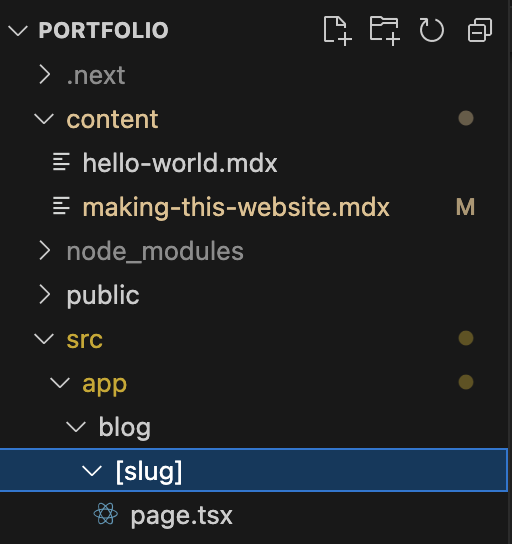
Next.js handles this through a dynamic route at src/app/blog/[slug]/page.tsx. The [slug] in the folder name tells Next.js this segment is variable. At build time, generateStaticParams() reads all the filenames from content/ and returns them as a list, which Next.js uses to pre-render one page per post:
export async function generateStaticParams() {
  return getAllSlugs(); // ["building-this-site", "kvm-setup", ...]
}
The result is static HTML for every post, generated at build time, served from the CDN edge. Fast, simple, and no server required per request.
When you add a new post, push to main, and Amplify rebuilds, the new slug is picked up automatically. The architecture scales to hundreds of posts without any changes to the routing code. I just... write an mdx file like this.
Thanks for reading my first post! I'll make more as I continue my projects!